
Deutsche Version weiter unten, hier klicken.
Connecting My FREMO Wireless Throttles Directly to DCC-EX CSB1
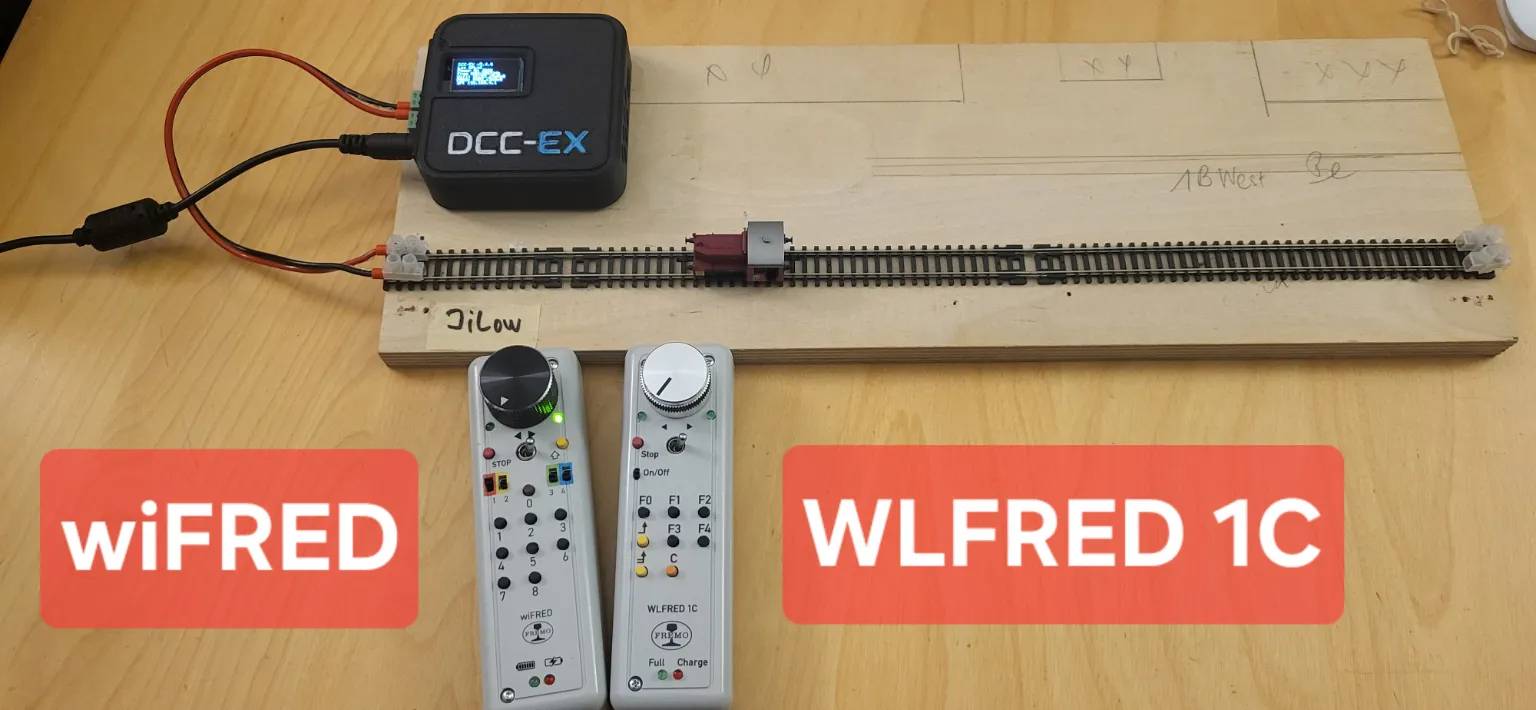
After experimenting with the DCC-EX CSB1 and its various software tools, I wanted to try something different: operating a locomotive with my FREMO wireless hand controllers, the WLFRED 1C and wiFRED.
I already use the CSB1 for testing locomotives and programming their DCC decoders with EX-Toolbox, as described in my earlier post, Programming DCC CVs with DCC-EX CSB1 and EX-Toolbox.
For FREMO hand controllers, I also have an Intellibox II and PiLocoBuffer. However, since the CSB1 has a built-in WiThrottle server, I was curious whether the wireless throttles could connect directly to it without any additional hardware.
On 27 November 2026, I first tested this arrangement successfully with my Arnold Köf II (DCC address 881) and WLFRED 1C. I then repeated the wireless running test successfully with the wiFRED.
Configuring the WLFRED 1C
The WLFRED 1C has a browser-based configuration interface, which makes it relatively straightforward to set up the locomotive address, Wi-Fi network and WiThrottle server connection.
For this test, my WLFRED 1C was running firmware 20260630 RB. I numbered the four relevant settings on my configuration screenshot.
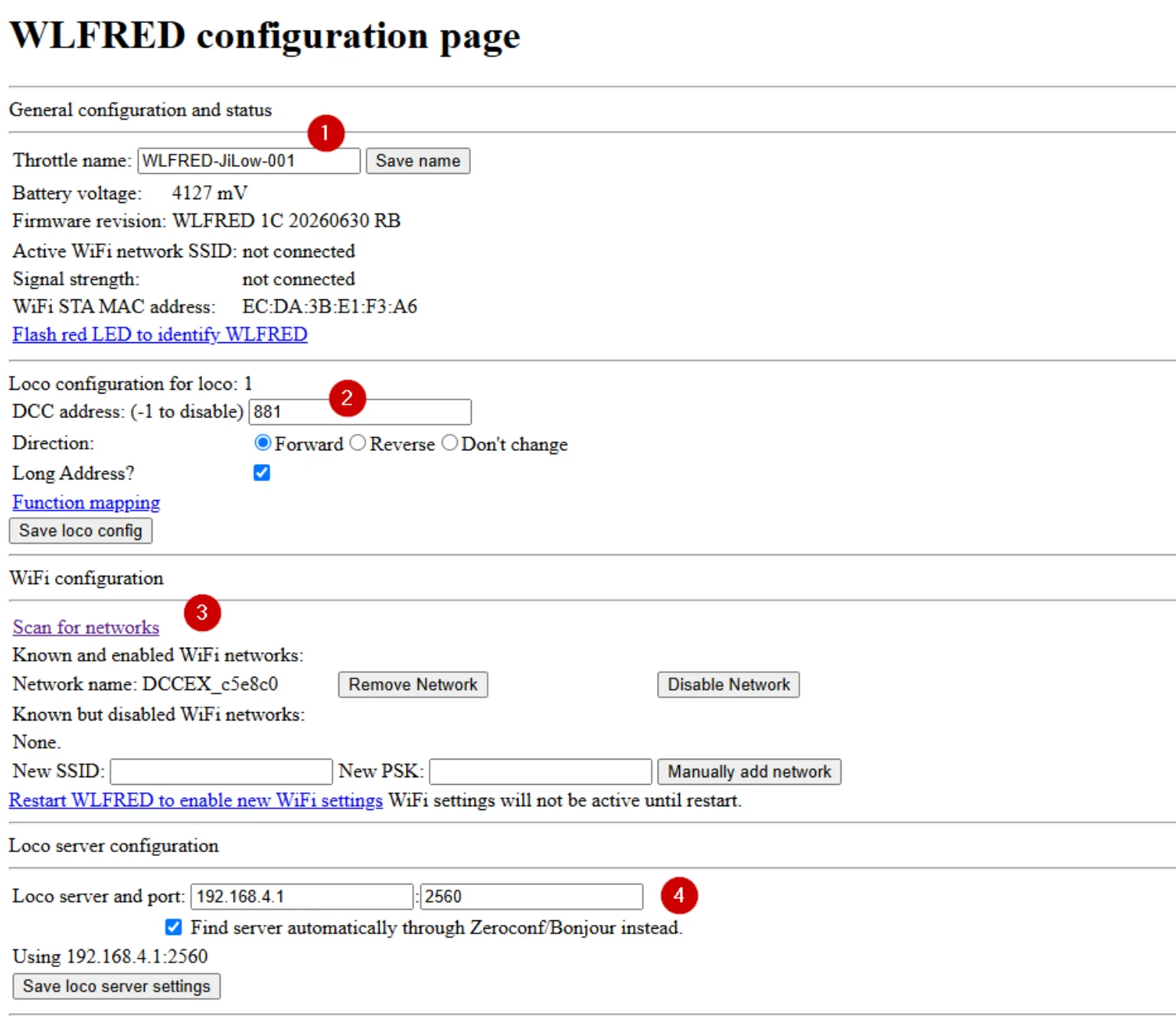
| No. | Configuration | Setting |
|---|---|---|
| 1 | Throttle name | WLFRED-JiLow-001 |
| 2 | Locomotive | DCC address 881, Long Address enabled, Forward |
| 3 | Wi-Fi network (SSID) | DCCEX_c5e8c0 |
| 4 | WiThrottle server | 192.168.4.1, TCP port 2560 |
1. Throttle Name
I named my controller WLFRED-JiLow-001 so that I could identify it more easily, particularly when using several wireless controllers.
2. Locomotive Configuration
For this first test, I configured the WLFRED to control my Arnold Köf II using DCC address 881. I enabled Long Address and left the direction setting at Forward. The WLFRED 1C is designed to control one locomotive at a time, consistent with the usual FREMO approach of assigning a locomotive to an individual driver.
3. Wi-Fi Configuration
Under Wi-Fi configuration, I added and enabled the wireless network broadcast by my DCC-EX CSB1: DCCEX_c5e8c0. This allows the WLFRED to connect directly to the CSB1’s Wi-Fi access point, without requiring a separate wireless router.
4. Locomotive Server Configuration
The WLFRED communicates with the CSB1 using the WiThrottle protocol. The connection settings shown on the configuration page were server IP address 192.168.4.1 and TCP port 2560. Interestingly, Find server automatically through Zeroconf/Bonjour instead was also enabled. The page displayed Using 192.168.4.1:2560, indicating the server address being used.
One detail worth mentioning is that the screenshot shows the active Wi-Fi network as not connected. This was the status displayed while accessing the configuration page. The subsequent running test confirmed that the controller could establish a working connection to the CSB1.
First Running Test with My Arnold Köf II
With the WLFRED configured, I connected the DCC-EX CSB1 to my short test track and placed my Arnold Köf II on the rails. The result was successful. The Köf responded to the WLFRED’s commands and moved along the test track.
No Intellibox II, PiLocoBuffer or additional LocoNet interface was required for this test.
At this stage, I was mainly interested in establishing whether the connection worked and whether the locomotive could be operated successfully. I have not yet made a detailed assessment of minimum speed, acceleration, braking, response delay or precise stopping. These will form part of my next running tests.
Configuring the wiFRED
After the WLFRED 1C test worked, I wanted to find out whether the older wiFRED could also use the CSB1’s WiThrottle server. The wiFRED configuration page is similar, but it allows me to store four locomotive addresses rather than just one.
My wiFRED was running firmware 2022-10-16-71ca8c3-master. The two screenshots show the settings used for the test.
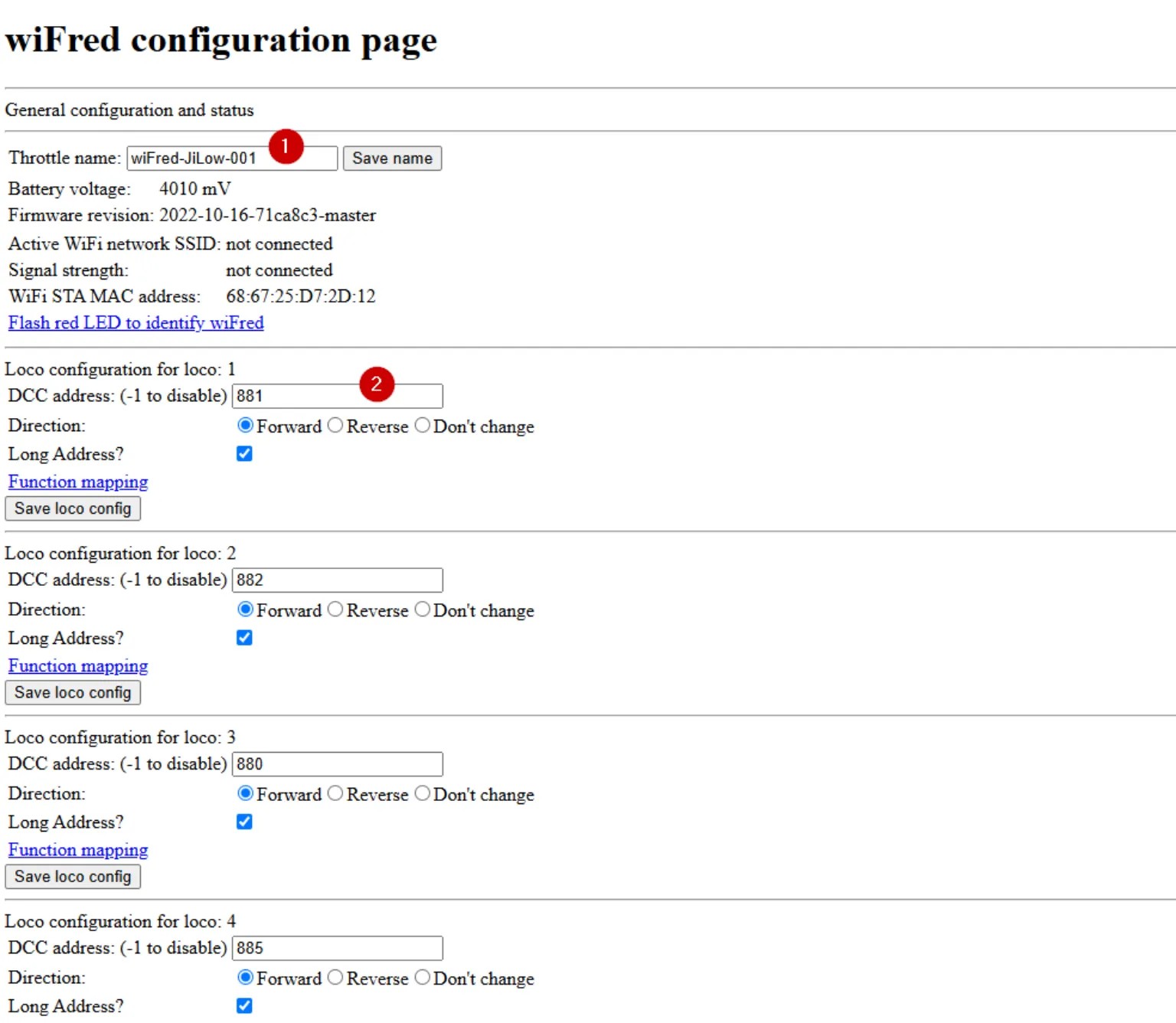
| No. | Configuration | Setting |
|---|---|---|
| 1 | Throttle name | wiFred-JiLow-001 |
| 2 | Locomotive 1 | Arnold Köf II – 881, Long Address, Forward |
| 2 | Locomotive 2 | V20 – 882, Long Address, Forward |
| 2 | Locomotive 3 | BR 139 – 880, Long Address, Forward |
| 2 | Locomotive 4 | ÖBB Rh 1116 – 885, Long Address, Forward |
I assigned the throttle name wiFred-JiLow-001. The four configured DCC long addresses are 881, 882, 880 and 885. These are the four addresses stored on the handset. So far, I have successfully tested the Köf II (881) and V20 (882) with the wiFRED; the other two locomotives have not yet been tested in this setup.
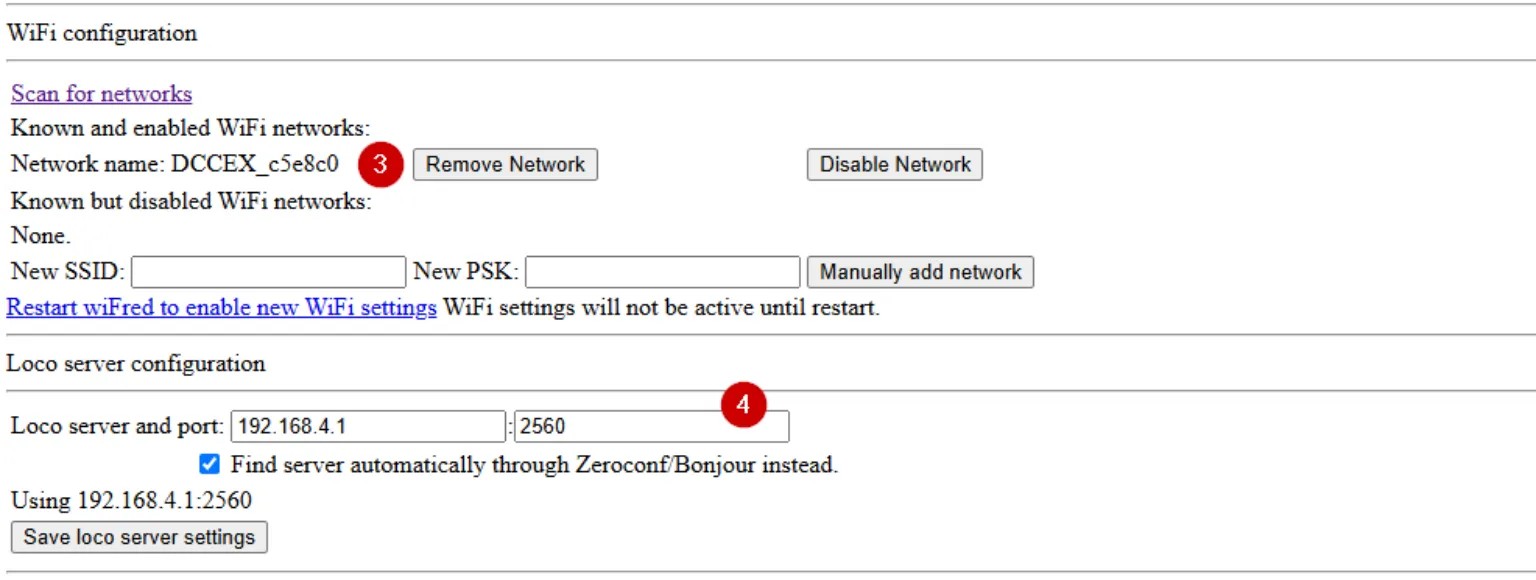
| No. | Configuration | Setting |
|---|---|---|
| 3 | Wi-Fi network (SSID) | DCCEX_c5e8c0 |
| 4 | WiThrottle server | 192.168.4.1, TCP port 2560 |
| 4 | Server discovery | Zeroconf/Bonjour enabled |
As with the WLFRED 1C, I enabled the CSB1’s Wi-Fi network DCCEX_c5e8c0. The server configuration displayed 192.168.4.1:2560 with Find server automatically through Zeroconf/Bonjour instead selected. It also showed Using 192.168.4.1:2560. This records the server in use, not proof that I entered the IP address manually.
The configuration screenshots show not connected under the active Wi-Fi network, as they were taken while accessing the configuration page. The following running test separately confirmed that the operating connection worked.
Running Test with the wiFRED
With those settings saved, I carried out another successful running test on the short CSB1 test track, this time using the wiFRED to control the Köf II. As with the WLFRED 1C, no PiLocoBuffer or Intellibox II was needed for this direct WiThrottle connection.
That establishes a working WiThrottle connection with both of my FREMO wireless hand controllers. It does not yet establish how the two controllers compare in response time, fine speed control or reliable reconnection. Those are separate tests.
Testing the wiFRED Locomotive Selection Switches
After confirming that the wiFRED could operate the Köf II, I tried the V20 as well. With switch 2 selected, the V20 (DCC address 882) ran well. I then changed to switch 1 for the Köf II (DCC address 881). The Köf also ran well, while the V20 did not move.
I then put both switches 1 and 2 in the ON position. This time, both locomotives moved, each at its own speed setting. That was an interesting result: during this test, selecting both locomotive slots allowed both locomotives to move, without forcing them to run at the same speed.
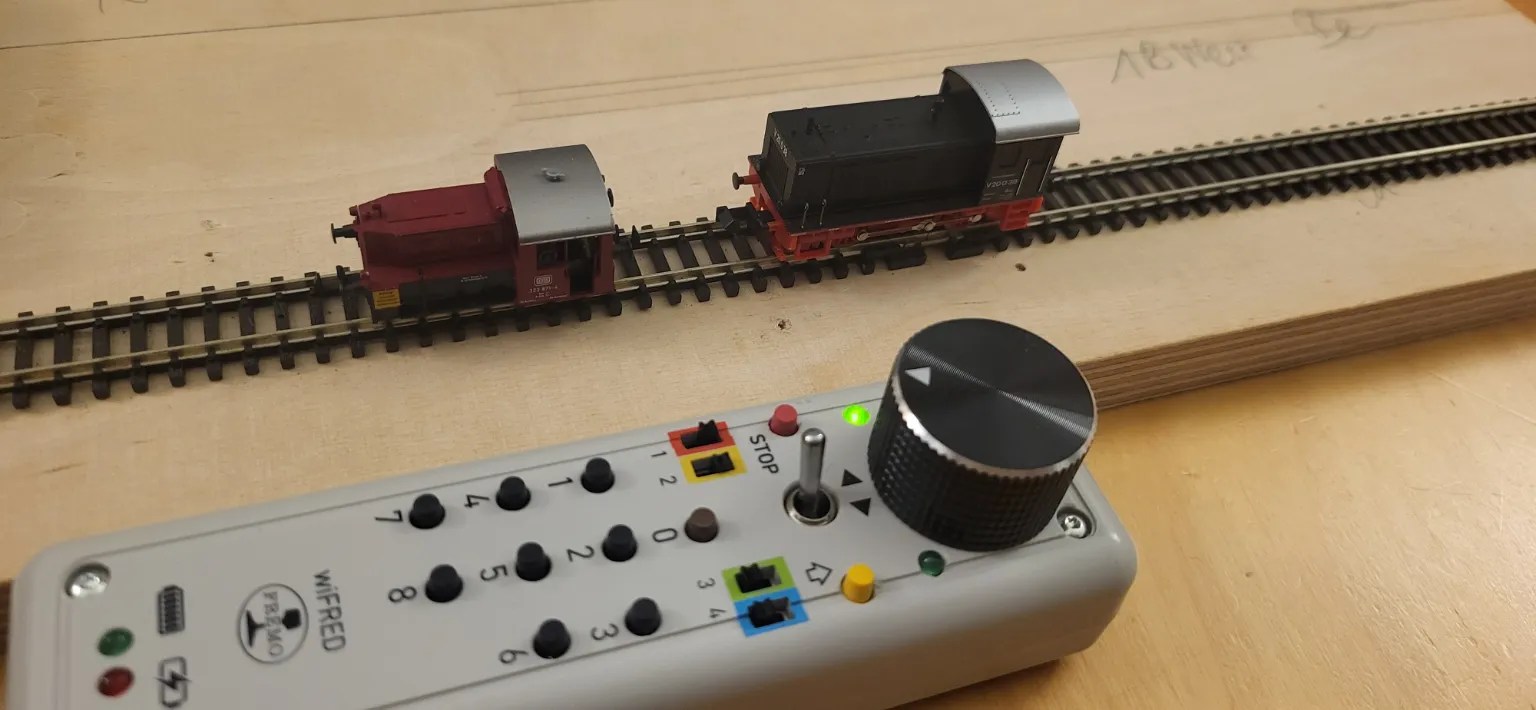
These observations apply to this particular test with my wiFRED and CSB1. I have not yet checked whether the two locomotives can be adjusted independently while both switches remain ON, nor have I established how the controller behaves with other combinations of selected slots.
My Initial Impressions
What I particularly like about this arrangement is its simplicity. At home, the CSB1 provides both the DCC track output and the WiThrottle server, and I can use either the WLFRED 1C or the wiFRED as a wireless hand controller. I can still use the Engine Driver app on my smartphone as well. This is what makes the built-in WiThrottle server so useful to me: I can choose between a physical FREMO hand controller and a smartphone throttle without adding another interface.
There is one important distinction, though. I use the DCC-EX CSB1 only at home. At a FREMO meeting, my wireless hand controllers will connect through the meeting’s LocoNet/PiLocoBuffer arrangement to whichever central command station is being used there, as part of the FRED and LocoNet approach to FREMO operation. I do not intend to bring the CSB1 into the FREMO command-station setup.
Another advantage is that I have already reserved FREMO DCC locomotive address blocks to avoid address conflicts at meetings. I use those same DCC addresses at home. That means I do not need to change the locomotive addresses stored in my wiFRED or WLFRED 1C, or reprogramme the decoders, when moving between home and FREMO operation. The relevant Wi-Fi connection still needs to be available and selected for each setup, of course, but the locomotive addresses remain the same.
That is the flexibility I was looking for: the CSB1 and WiThrottle at home, the meeting’s central command station and LocoNet/PiLocoBuffer at FREMO, and the same wireless hand controllers and locomotive addresses in both environments. Both the WLFRED 1C and wiFRED have now worked directly with my DCC-EX CSB1, without any additional interface. Their connection and running tests at home were successful. The one comparison I still want to make is with my Intellibox II and PiLocoBuffer, to see how both wireless hand controllers behave through the LocoNet-based arrangement I intend to use at FREMO meetings. That will complete the comparison between the two setups without changing the locomotive addresses I have already assigned.
Sources
- DCC-EX – Official project documentation
- DCC-EX – EX-CommandStation
- WLFRED – Software and configuration
- Programming DCC CVs with DCC-EX CSB1 and EX-Toolbox
DEUTSCHE VERSION
FREMO-Funkhandregler erfolgreich mit der DCC-EX CSB1 verbunden
Meine drahtlosen FREMO-Handregler direkt mit der DCC-EX CSB1 verbinden
Nachdem ich mich bereits mit der DCC-EX CSB1 und den verschiedenen Softwarewerkzeugen beschäftigt hatte, wollte ich nun etwas Neues ausprobieren: eine Lokomotive mit meinen drahtlosen FREMO-Handreglern WLFRED 1C und wiFRED steuern.
Die CSB1 nutze ich bereits zum Testen meiner Lokomotiven und zum Programmieren der DCC-Decoder mit EX-Toolbox. Darüber habe ich in meinem früheren Beitrag DCC-CVs programmieren mit DCC-EX CSB1 und EX-Toolbox berichtet.
Für meine FREMO-Handregler habe ich außerdem eine Intellibox II mit PiLocoBuffer. Da die CSB1 jedoch bereits über einen integrierten WiThrottle-Server verfügt, wollte ich herausfinden, ob sich die beiden drahtlosen Handregler auch ohne zusätzliche Hardware direkt damit verbinden lassen.
Am 27. November 2026 konnte ich diese Verbindung zunächst mit meiner Arnold Köf II (DCC-Adresse 881) und dem WLFRED 1C erfolgreich testen. Anschließend gelang mir auch der drahtlose Fahrversuch mit dem wiFRED.
Konfiguration des WLFRED 1C
Der WLFRED 1C lässt sich über eine webbasierte Konfigurationsoberfläche einrichten. Dort kann ich unter anderem die Lokadresse, die WLAN-Verbindung und den WiThrottle-Server festlegen.
Für diesen Versuch verwendete ich meinen WLFRED 1C mit der Firmware 20260630 RB. Auf meinem Screenshot habe ich die vier relevanten Einstellungen nummeriert.
| Nr. | Konfiguration | Einstellung |
|---|---|---|
| 1 | Name des Handreglers | WLFRED-JiLow-001 |
| 2 | Lokomotive | DCC-Adresse 881, Long Address aktiviert, Forward |
| 3 | WLAN-Netzwerk (SSID) | DCCEX_c5e8c0 |
| 4 | WiThrottle-Server | 192.168.4.1, TCP-Port 2560 |
1. Name des Handreglers
Zunächst habe ich meinem WLFRED den Namen WLFRED-JiLow-001 gegeben. Damit kann ich ihn leichter identifizieren, insbesondere wenn später mehrere drahtlose Handregler gleichzeitig im Einsatz sind.
2. Lokkonfiguration
Für meinen ersten Versuch habe ich die DCC-Adresse 881 meiner Arnold Köf II eingetragen. Die Option Long Address habe ich aktiviert und die Fahrtrichtung auf Forward belassen. Der WLFRED 1C ist für die Steuerung einer Lokomotive zur gleichen Zeit vorgesehen. Das entspricht dem üblichen FREMO-Prinzip, bei dem ein Lokführer seinen Handregler für eine bestimmte Lokomotive erhält.
3. WLAN-Konfiguration
Unter der WLAN-Konfiguration habe ich das Netzwerk meiner DCC-EX CSB1 hinzugefügt und aktiviert: DCCEX_c5e8c0. Damit verbindet sich der WLFRED direkt mit dem WLAN-Zugangspunkt der CSB1. Ein zusätzlicher WLAN-Router ist dafür nicht notwendig.
4. Konfiguration des Lokservers
Die Kommunikation zwischen WLFRED und CSB1 erfolgt über das WiThrottle-Protokoll. Auf der Konfigurationsseite waren die IP-Adresse 192.168.4.1 und der TCP-Port 2560 zu sehen. Interessanterweise war auch die Option Find server automatically through Zeroconf/Bonjour instead aktiviert. Die Konfigurationsseite zeigte darunter Using 192.168.4.1:2560 an. Damit war ersichtlich, welche Serveradresse verwendet wurde.
Eine Kleinigkeit ist mir dabei aufgefallen: Beim aktiven WLAN-Netzwerk zeigte die Konfigurationsseite not connected an. Dies war der angezeigte Status während des Aufrufs der Konfigurationsoberfläche. Der anschließende Fahrversuch bestätigte jedoch, dass der WLFRED eine funktionierende Verbindung zur CSB1 herstellen konnte.
Erster Fahrversuch mit meiner Arnold Köf II
Nachdem ich die Einstellungen vorgenommen hatte, schloss ich die DCC-EX CSB1 an mein kurzes Testgleis an und stellte meine Arnold Köf II auf die Schienen. Der Versuch war erfolgreich. Die Köf reagierte auf die Steuerbefehle des WLFRED und ließ sich auf dem Testgleis bewegen.
Für diesen Aufbau benötigte ich weder die Intellibox II noch den PiLocoBuffer oder eine zusätzliche LocoNet-Schnittstelle.
Bei diesem ersten Versuch wollte ich zunächst nur klären, ob die Verbindung funktioniert und sich die Lokomotive damit steuern lässt. Eine genauere Beurteilung der Mindestgeschwindigkeit, des Beschleunigungs- und Bremsverhaltens, der Reaktionszeit und des punktgenauen Anhaltens steht noch aus. Das möchte ich bei den nächsten Fahrversuchen untersuchen.
Konfiguration des wiFRED
Nachdem die Verbindung mit dem WLFRED 1C funktioniert hatte, wollte ich auch meinen älteren wiFRED direkt mit dem WiThrottle-Server der CSB1 ausprobieren. Die Konfigurationsoberfläche ist ähnlich aufgebaut. Anders als beim WLFRED 1C kann ich hier jedoch vier Lokadressen hinterlegen.
Auf meinem wiFRED läuft die Firmware 2022-10-16-71ca8c3-master. Die beiden Screenshots zeigen die Einstellungen für den Versuch.
| Nr. | Konfiguration | Einstellung |
|---|---|---|
| 1 | Name des Handreglers | wiFred-JiLow-001 |
| 2 | Lokomotive 1 | Arnold Köf II – 881, Long Address, Forward |
| 2 | Lokomotive 2 | V20 – 882, Long Address, Forward |
| 2 | Lokomotive 3 | BR 139 – 880, Long Address, Forward |
| 2 | Lokomotive 4 | ÖBB Rh 1116 – 885, Long Address, Forward |
Den Handregler habe ich wiFred-JiLow-001 genannt. Hinterlegt sind die vier DCC-Langadressen 881, 882, 880 und 885. Das sind die vier im Handregler gespeicherten Adressen. Bisher habe ich die Köf II (881) und die V20 (882) erfolgreich mit dem wiFRED getestet; die beiden anderen Lokomotiven wurden in diesem Aufbau noch nicht erprobt.
| Nr. | Konfiguration | Einstellung |
|---|---|---|
| 3 | WLAN-Netzwerk (SSID) | DCCEX_c5e8c0 |
| 4 | WiThrottle-Server | 192.168.4.1, TCP-Port 2560 |
| 4 | Serversuche | Zeroconf/Bonjour aktiviert |
Wie beim WLFRED 1C habe ich das WLAN der CSB1 mit der SSID DCCEX_c5e8c0 aktiviert. Die Serverkonfiguration zeigte 192.168.4.1:2560. Dabei war die Option Find server automatically through Zeroconf/Bonjour instead angehakt. Angezeigt wurde außerdem Using 192.168.4.1:2560. Daraus geht hervor, welcher Server verwendet wurde, nicht aber, dass ich die IP-Adresse manuell eingetragen habe.
Während des Aufrufs der Konfigurationsseite stand beim aktiven WLAN-Netzwerk not connected. Der anschließende Fahrversuch bestätigte unabhängig davon, dass die Verbindung im Fahrbetrieb funktionierte.
Fahrversuch mit dem wiFRED
Mit diesen Einstellungen habe ich einen weiteren erfolgreichen Fahrversuch auf meinem kurzen CSB1-Testgleis durchgeführt. Diesmal steuerte ich die Köf II mit dem wiFRED. Auch dafür benötigte ich weder den PiLocoBuffer noch die Intellibox II.
Damit habe ich nun bestätigt, dass die direkte WiThrottle-Verbindung mit beiden meiner drahtlosen FREMO-Handregler funktioniert. Ob sich bei der Reaktionszeit, beim feinfühligen Rangieren oder beim erneuten Verbinden Unterschiede zeigen, muss ich noch getrennt untersuchen.
Die Lokauswahlschalter des wiFRED im Test
Nachdem ich die Köf II erfolgreich mit dem wiFRED gesteuert hatte, wollte ich auch meine V20 ausprobieren. Mit Schalter 2 lief die V20 (DCC-Adresse 882) gut. Anschließend wechselte ich auf Schalter 1 für die Köf II (DCC-Adresse 881). Auch die Köf lief gut, während sich die V20 nicht bewegte.
Danach stellte ich beide Schalter 1 und 2 auf ON. Nun fuhren beide Lokomotiven, allerdings jeweils mit ihrer eigenen Geschwindigkeitseinstellung. Das war für mich eine interessante Beobachtung: In diesem Versuch konnten beide Lokomotiven gleichzeitig fahren, ohne dass sie dieselbe Geschwindigkeit hatten.
Diese Beobachtungen beziehen sich zunächst auf meinen Versuch mit wiFRED und CSB1. Ob ich die Geschwindigkeiten bei gleichzeitig eingeschalteten Schaltern unabhängig voneinander verändern kann und wie sich weitere Kombinationen verhalten, habe ich noch nicht getestet.
Meine ersten Eindrücke
Was mir an dieser Kombination besonders gefällt, ist der einfache Aufbau. Zu Hause stellt die CSB1 sowohl das DCC-Gleissignal als auch den WiThrottle-Server bereit. Als drahtlose Handregler kann ich wahlweise den WLFRED 1C oder den wiFRED verwenden. Außerdem kann ich weiterhin die Engine-Driver-App auf meinem Smartphone nutzen. Gerade das gefällt mir am integrierten WiThrottle-Server: Ich kann zwischen einem FREMO-Handregler und dem Smartphone wechseln, ohne eine weitere Schnittstelle zu benötigen.
Wichtig ist mir dabei die Trennung der beiden Einsatzbereiche: Die DCC-EX CSB1 verwende ich ausschließlich zu Hause. Bei FREMO-Treffen sollen sich meine drahtlosen Handregler über LocoNet/PiLocoBuffer mit der dort vorhandenen Digitalzentrale verbinden – unabhängig davon, welche Zentrale beim jeweiligen Treffen eingesetzt wird. Die Grundlagen dazu habe ich in meinem Beitrag FREMO-Betrieb: FRED und LocoNet beschrieben. Die CSB1 ist also nicht als Zentrale für den FREMO-Aufbau vorgesehen.
Ein weiterer Vorteil sind meine bereits reservierten FREMO-DCC-Adressblöcke. Damit möchte ich Adresskonflikte bei FREMO-Treffen vermeiden. Dieselben Lokadressen verwende ich auch zu Hause. Ich muss deshalb weder die im wiFRED und WLFRED 1C hinterlegten DCC-Adressen noch die Decoderadressen ändern, wenn ich zwischen beiden Einsatzbereichen wechsle. Lediglich die passende WLAN-Verbindung muss für den jeweiligen Aufbau verfügbar und ausgewählt sein.
Genau diese Flexibilität hatte ich mir erhofft: Zu Hause die CSB1 mit WiThrottle, beim FREMO-Treffen die dortige Digitalzentrale mit LocoNet/PiLocoBuffer – und in beiden Fällen dieselben drahtlosen Handregler mit denselben Lokadressen. Sowohl der WLFRED 1C als auch der wiFRED funktionieren inzwischen direkt mit meiner DCC-EX CSB1, ganz ohne zusätzliche Schnittstelle. Die Verbindungs- und Fahrversuche zu Hause waren erfolgreich. Jetzt möchte ich nur noch beide Funkhandregler mit meiner Intellibox II und dem PiLocoBuffer vergleichen. Dabei geht es mir darum, wie sie sich über den LocoNet-Aufbau verhalten, den ich bei FREMO-Treffen verwenden möchte. Danach habe ich beide Einsatzmöglichkeiten verglichen, ohne die bereits vergebenen Lokadressen ändern zu müssen.

